01 · Find the meeting
Open the agenda for the right date.
On a district’s website, look for School Board, then Meetings or Agendas. For this example, open New Braunfels ISD’s meeting list.
Find September 14, 2026. Choose Agenda in that row. Newer meetings may appear above it.
Can’t find the meeting?
Use Command + F on a Mac or Ctrl + F on Windows to search the page for the date. If it isn’t in the visible list, look for an archive or date filter.
You should be on an agenda for New Braunfels ISD’s September 14, 2026 meeting. Keep the date and district name in view or in your note.
02 · Open the attachment
Look beneath the agenda item.
Find 8.C., the item about approval of new library materials for purchase and book donations. Under its four attachments, choose the link ending in September 2026 Book List (High School).
On a long agenda, use the browser’s Find command to search for 8.C. or High School.
You should see the high-school list in a document viewer. An agenda describes business planned for a meeting; the attached list alone does not tell you what the board decided.
03 · Save the PDF
Use the document viewer’s download control.
In this captured BoardBook viewer, open the menu at the upper left and choose Download. If the site asks where to save it, choose Downloads or a folder you’ll remember.
My viewer looks different
Look for a downward arrow, Download, or Save in the document’s controls. The controls can be separate from the browser’s own menu.
Open the publisher’s PDF directly, or download our verified preserved copy.
A file should now be in the folder you chose. Seeing the document in a browser tab is not the same as keeping a saved copy.
04 · Check your saved copy
Open the file once.
Open your saved PDF from the folder you chose. Check that it says September 2026 Book List (High School) and has 49 pages. The list has columns for number, title, author, ISBN, and age.
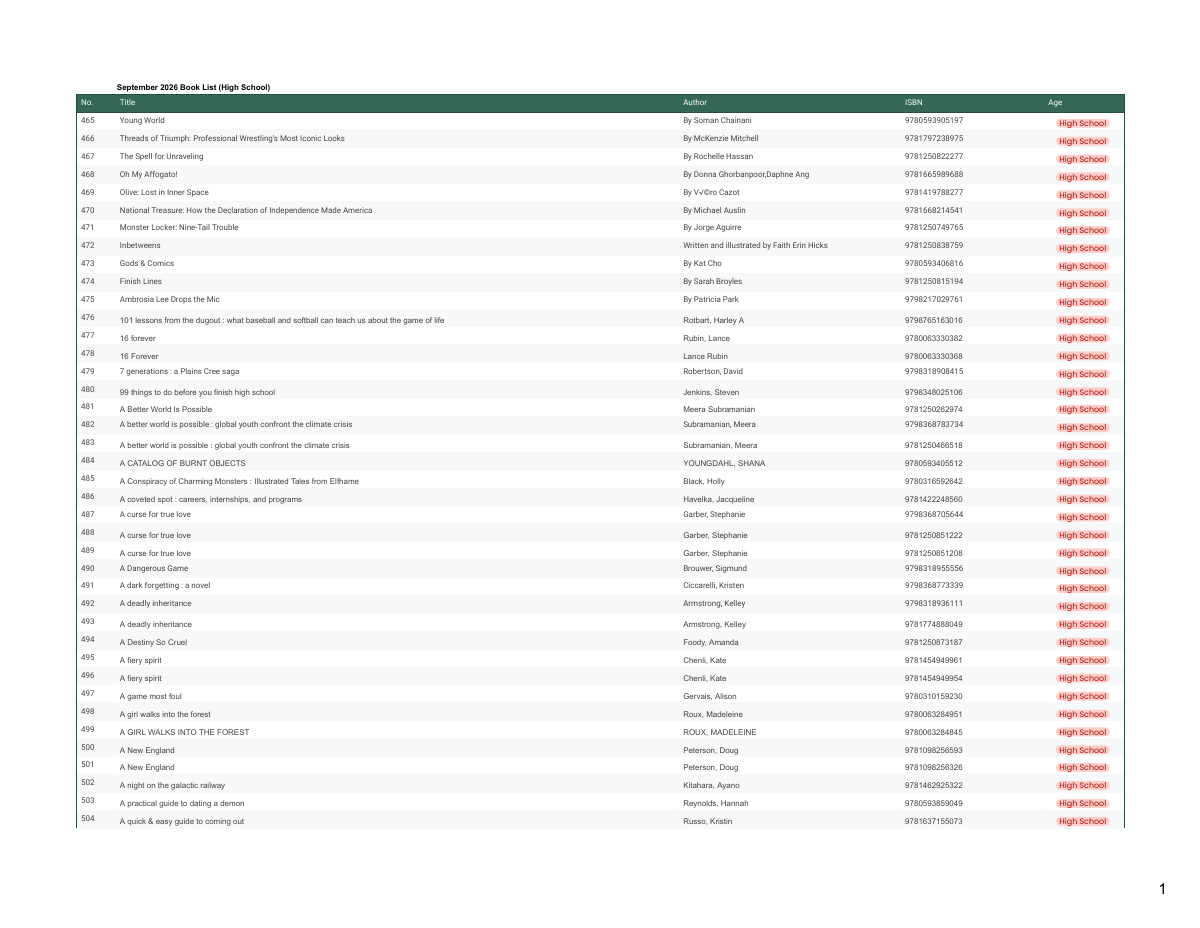 Open the full 49-page PDF
 Give the file a name you’ll recognize, such as 2026-09-14-high-school-book-list.pdf. That date is the meeting date. Keep the date you saved it separately.
The file opens as a webpage, or won’t open
You may have saved the viewer page instead of the PDF. Return to the document’s download control or the direct PDF link above. Open the new saved file and check its contents.
I downloaded it twice
Keep the earlier copy until you’ve checked the new one. Your browser may add a number to the filename or ask how to handle an existing name. Don’t replace the earlier file just to make the name look tidy.
Can you open the file from its saved folder without returning to the agenda? Check the title and page count, not just the filename.
05 · Keep a source note
Keep the links and your question beside the file.
Record the district, meeting date, agenda item, attachment title, original links, and the date you saved your copy. Add what the attachment shows and what you still need to find out.
A note for this example
- My question
- Which high-school books were listed for purchase or donation?
- Source
- New Braunfels ISD · September 14, 2026 · Agenda item 8.C
- Attachment
- September 2026 Book List (High School) · 49 pages
- What it shows
- This book list is attached to the agenda item about library materials for purchase and donations.
- Still to check
- What action did the board take? The attachment alone does not establish approval or purchase.
Start with the same source-note template
Use the blank form for your own meeting, or compare your note with the completed example.
Download this completed exampleClose the agenda tab. Use your note to find both the agenda item and your saved attachment again. Add any detail you needed but hadn’t written down.
Use it at your own library
Follow one attachment from another meeting.
Pick a meeting from your own district or library board. Choose one agenda item, save one attachment, and use the note template to describe it.
Your meeting portal may use different labels. Look for Agenda, Packet, Supporting documents, or Attachments. Keep your question small enough to check against one record.
The document I need is not posted
Write down the specific document you need, the meeting or topic it concerns, and where you looked. Check the issuing body’s website for a public-records contact or request instructions. Keep a copy of any request and response.
You can open a saved original, return to the agenda item from your note, and explain what the attachment establishes and what remains to check.
Check your understanding
Did you keep the right record?
See the answers
1: Open the saved PDF and check its contents and page count. 2: It establishes that the list was attached to the agenda item. A vote or purchase needs another record. 3: Keep the meeting date and your save date separately.
Sources and the saved copy
Keep the original within reach.
- New Braunfels ISD meeting list and September 14, 2026 agenda. Item 8.C and its high-school attachment were checked online on October 25, 2026. Meeting list · Agenda.
- September 2026 Book List (High School). 49-page PDF, preserved with the October 3 walkthrough. The publisher’s PDF matched the preserved copy byte for byte on October 25. Publisher’s PDF · Download the preserved original.
- Three Safari screenshots captured October 3, 2026. Original PNGs are retained unchanged. On-page crops and outlines point to the controls used in this example. The current agenda and PDF were rechecked; the current viewer’s visual menu layout was not re-tested.
Check file details and preservation
- Original PDF
- 2026-09-14-high-school-book-list.pdf
- File size and page count
- 476,251 bytes · 49 pages
- SHA-256
- f9256357c3b7c4179e094a1873b1aa982278c6076532906b7bed76219e709ff2
Try the company question next.
Use the same source-note approach to trace the company behind a library app.
Trace the company behind Libby